The rear vision system is one of the most outstanding innovations in the automotive industry.
A driver doesn’t need to use the inner mirror or turn backward to reverse without hitting an object anymore. Instead, it is almost like you’re driving forward when reversing with the help of the monitor.
However, you may suddenly see – “Service Rear Vision System” on the infotainment screen after using the rearview camera for a while.
This error signal is not a big deal, but it would be best if you understood the rear vision system and what the warning signal means.
That will enable you to fix the service rear vision system in a GMC Terrain before it degenerates into something else and tampers with other components in the vehicle. So, let’s jump on everything you need to know about the rear vision system.
What is Rear Vision System and How it Works?
Rear vision system is a safety technology and most modern cars are equipped with it. When the driver uses the “reverse gear” in an automatic car, the rear vision system synergizes the operations of a rearview camera and the monitor (infotainment screen) in a car to display the image in the vehicle’s rear area.
Cars equipped with the system don’t crash against objects behind them when parking or reversing. This system makes driving convenient for people who can’t reverse properly or have problems with parallel parking.
The rear vision system works backing up the rear view camera and the dashboard screen. The camera doesn’t operate when you put the car in any other gear like park or drive.
However, once you put your car in the reverse gear, the system triggers the camera, which sends the display of the image at the car’s rear to the infotainment screen.
This makes it easy for drivers to reverse without crashing in any object, vehicle or person behind the vehicle.
What Does “Service Rear Vision System” Mean?
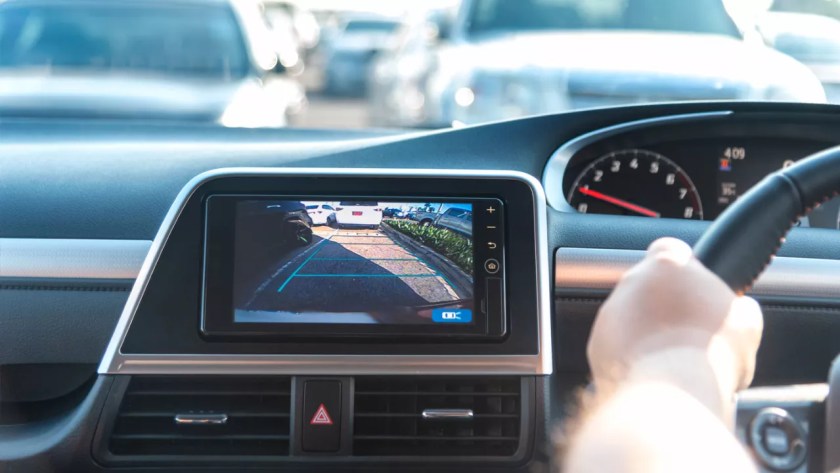
When your vehicle displays the “Service Rear Vision System” warning, it’s telling you that something in this camera system isn’t working correctly. This doesn’t always mean a total failure—you might still see an image, but it could be:
- Blurry or distorted
- Blue or black screen
- Flickering or freezing
- Showing incorrect guidelines
- Not appearing at all when you shift to reverse
Regardless of the specific symptoms, this warning should never be ignored since it affects your ability to reverse safely.
Common Causes of Rear Vision System Problems
#1. Water Damage and Corrosion.
One of the most frequent culprits behind rear vision problems is water infiltration. Your camera isn’t always as waterproof as it should be.
Multiple manufacturer bulletins have identified water intrusion issues in vehicles like the Chevrolet Silverado and GMC Sierra. Once moisture gets into the camera housing or wiring connections, corrosion quickly follows.
Signs of water damage include:
- White or green corrosion on connectors
- Intermittent camera function (works sometimes but not others)
- Camera failures during or after rainy weather
In severe cases, water can travel through the wiring harness to the Video Processing Module (VPM) located inside your vehicle, causing extensive damage to this expensive component.
#2. Damaged Wiring and Connections.
The camera connects to your vehicle’s systems through a specialized coaxial cable that runs from the rear of your vehicle to the dashboard area. This wiring is vulnerable to:
- Fraying from road debris
- Pinching during repairs or manufacturing
- Loose connections from vehicle vibration
- Damage from rodents (who sometimes chew on wiring)
Technical service bulletins from multiple manufacturers have identified wiring issues as a common source of rear vision system failures. Sometimes the problem is as simple as a disconnected plug, but other times the entire wiring harness needs replacement.
#3. Electrical and Fuse Issues.
Like any electrical system, your rear vision camera relies on proper power supply:
- Blown fuses (often 10A fuses labeled F40 in GMC or F107 in Dodge vehicles)
- Power surges that damage the camera or module
- Poor grounding causing electrical interference
- Battery-related issues affecting voltage to the system
These electrical problems often cause the system to fail completely rather than showing distorted images.
#4. Software and Module Glitches.
Modern vehicles are essentially computers on wheels, and software problems are inevitable:
- Outdated VPM firmware misinterpreting camera signals
- Corrupted SD card data (where calibration information is stored)
- System conflicts after other vehicle repairs or updates
- Memory errors in the radio or infotainment system
GM has issued specific bulletins addressing software-related issues that cause blue or black screens with the “Service Rear Vision System” message.
#5. Physical Camera Damage.
Sometimes the problem is simple physical damage to the camera itself:
- Cracked lens from impact (rocks, debris, minor collisions)
- Dirt or mud covering the camera lens
- Camera misalignment from bumper damage
- Deteriorated lens coating causing cloudy images
How to fix service rear vision system?
Usually, water leaking into the rear vision system’s wiring is one of the main reasons why your vehicle displays the service rear vision system blue screen. However, resolving the issue may be somehow tricky, but not impossible.
So, the procedure below will help you fix the issue in your GMC truck. However, it can also rectify the service rear vision system in a Chevy Silverado.
Step 1: Park in a safe place.
Firstly, ensure to park the vehicle in a safe location before commencing the operation. To keep safe, this isn’t a task you perform on the way. In other words, if you discover this issue while on a journey, ensure to arrive first before you are up to fixing the problem.
So, once you’re home, drive into your garage and start the operation. You may want an assistant to help you with a few things to make it faster. However, it is something you can do alone.
Step 2: Remove the vehicle’s headliner.
Once you park the vehicle, kindly turn off the engine and remove the key. Then, get a flat head screwdriver to remove the screw on the clips used to hold the headliner in place at the corners of the roof.
Also, carefully remove the inner light to enable you to pull down the headliner easily to access the rearview camera wiring.
Step 3: Remove the headrest for more room.
You may also have to remove the headrest to provide more room, allowing the headliner to come down to a point where you can work on the system easily.
So, carefully press the button on top of the seat, connecting the headrest beneath it. Then, remove the headrest at once.
Step 4: Remove the border above the rear window.
Now, look through the headliner’s open space above the backseat and locate the bolts holding the top border at the rear window area.
Then, loosen the bolts and remove the border to access the holes where water possibly penetrates to cause a malfunction in the wiring.
Step 5: Clean and seal holes with silicone glue.
Once you remove the border at the rear area above the back window, you will most likely find dirt caused by water penetration into that area.
First, ensure to clean it up properly and allow it to dry. Then apply silicone glue to the holes where water easily penetrates to tamper with the rear vision system’s wiring.
Step 6: Reinstall the removed parts.
Lastly, carefully reinstall all the parts removed to access the leaking spots at the vehicle’s rear. Start by bolting on the border above the rear window.
Then, reinstall the headliner and fix the inner light. After that, fix the headrest in place and clean up the interior to remove any available dirt.
Once you complete this process, start the vehicle and engage the Reverse gear to check the rear view camera’s operation again.
This video will help to simplify the process if you’re also dealing with a service rear vision system in a Chevy Malibu. Correctly engaging the procedure should rectify the warning signal.
However, if it persists, kindly consult a professional auto technician to diagnose the actual cause of the problem and fix it immediately. The repair will only cost a few bucks.
What are the Benefits of the Service Rear Vision System?
There are many benefits to having a rear vision system in your vehicle. This type of system can help you see what is behind you when you are backing up, and it can also provide additional safety features such as blind spot detection.
Rear vision systems can also be helpful when parallel parking or when changing lanes on the highway. Overall, a rear vision system can give you added peace of mind when driving.
FAQs.
Q: What does the rear view monitor do?
The rear view monitor is a device mounted at the rear of a car. It sends a corresponding image at the rear end of the dashboard screen when you shift the gear to “Reverse – R.”
This rear view system reveals things behind your car when reversing to help prevent an unexpected accident behind the car when reversing.
Q: What is HD rear vision camera?
An HD rear vision camera works similarly to the regular rear view camera by displaying the rear area of a car when the “Reverse” gear is engaged. However, the HD rear vision camera displays a relatively high-resolution image compared to the normal rear view camera.
Most modern cars and light pickup trucks manufactured in the United States are fitted with a rear vision system.
Q: What is Chevy rear vision camera?
Chevy is fitted with the HD rear vision camera. This camera is mounted at the rear, where it sends a high-resolution image to the dashboard screen when the “Reverse” gear is engaged.
This enables the driver to see the vehicle’s rear clearly when reversing or parking without hitting an object.
While the Reverse gear triggers the camera, shifting back to Drive or Park will automatically turn it off again. However, the service rear vision system in a Suburban is the only issue with the rear view camera.
Q: What is GM HD rear vision camera?
GM HD rear vision camera is a monitoring device fitted in General Motors vehicles. The device displays an image behind the vehicle when in Reverse to help the driver see behind without looking backward.
This helps to avoid crashing into objects when backing up or parking. Some GM vehicles with an HD rear vision system include; the 2020 Chevrolet Suburban, 2020 Chevrolet Tahoe, 2020 Cadillac Escalade, 2020 Cadillac CT5/XT5, Mid-engine Corvette C8, etc.
However, you can install the camera if your car doesn’t have one.
Q: Where is the rear view camera located?
The rear view camera is located at the rear area of the car, usually at a position above the plate number in most vehicles. It is securely mounted such that rain and other factors will not be able to tamper with the system.
If you want to install an aftermarket rear view camera on your old car, ensure to fix the device in a perfect location at the rear. If you’re not a DIYer, kindly contact an expert auto technician to do the job.
Final Words
The Service Rear Vision System warning message will most likely surface once and again until you rectify the underlying issue. Therefore, if you’re still battling a malfunctioning rear view camera problem, ensure to implement the solution above.
However, if you’re not confident about fixing the service rear vision system in a GMC Acadia, kindly contact an expert auto technician to perform the task.